
My Top 10 Plenary Ideas

Below is a list of my favourite and most commonly used plenaries. They are from all over, and I have given credit if I can remember where I found it. Each has a description, an estimate for time needed, a difficulty rating (out of 5) and a student engagement rating (also out of 5). The difficulty rating is dependent on students’ understanding for the lesson, and the student engagement rating is based on my own experience with these plenaries.
Please add any other great ideas to the comments!
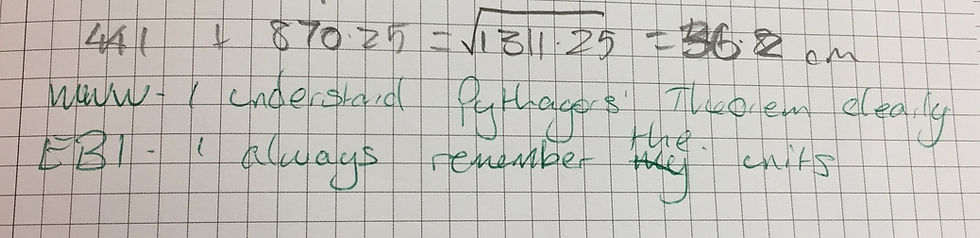
Number 10 - WWW and EBI
Time needed: 2 minutes
Difficulty: 1
Student engagement: 2
How it works: Students write down one thing they have done successfully (What Went Well) from the lesson, and one thing they would like to improve (Even Better If). Encourage students to use the keywords of the lesson so you don’t end up with “Even better if I worked faster”.
Number 9 - Two stars and a wish
Time needed: 3 minutes
Difficulty: 1
Student engagement: 2
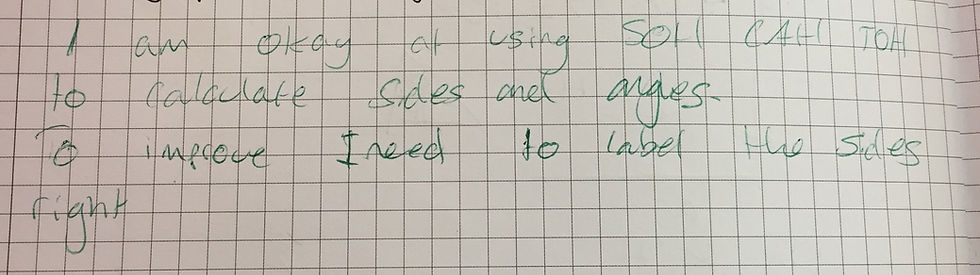
How it works: Not dissimilar from the one above, students write down two things they have done from the lesson, and one thing they would like to develop. Again, encourage the use of the lesson’s key words.
Number 8 - Text to a friend
Time needed: 3-5 minutes
Difficulty: 2
Student engagement: 4
How it works: I tend to introduce this with how much texts use to cost each, how the limit is 160 characters, and how I used to use “text speak” to reduce the message down to one text. After the class have laughed at how old I am, I ask them to write a concise text message to their friend with the key learning points from the lesson. Key words are encouraged, but I let them off with spelling to help them stay within the 160 characters.
Number 7 - Step-by-step guide
Time needed: 3-5 minutes
Difficulty: 3
Student engagement: 3
How it works: This works best for a topic that will be revisited in the following lesson. Students write a step-by-step guide for themselves or for a peer on the methodology used during the lesson. Some students prefer to write out an example and annotate it instead.
Number 6 - Design a “what’s the same, what’s different?”
Time needed: 5-10 minutes
Difficulty: 5
Student engagement: 3
How it works: I often use these types of questions as a starter activity to get students thinking about similarities and pre-empting misconceptions. This works particularly well for a topic involving equivalence. Students will find this challenging if they do not have a good understanding of the topic. Once students have created a “what’s the same, what’s different?”, depending on time, get them to swap, compare and discuss their creations.
Number 5 - Spot the mistake
Time needed: 5 minutes
Difficulty: 4
Student engagement: 3
How it works: These work best for multi-step problems or exam questions. Show students a question and an answer and they need to spot the mistake. Stretch and challenge are easy for this plenary as you can ask students to articulate the misconception or answer the question correctly.
Number 4 - Write an exam question
Time needed: 10 minutes
Difficulty: 5
Student engagement: 2
How it works: This requires a high level of understanding and for students to have come into contact with exam questions on that topic previously. It’s up to them to write a clear question, state its marks and write a corresponding mark scheme. Depending on time available, you may want to get students to swap their exam questions to answer them, then swap back to mark them using the mark scheme.
Number 3 - This is the answer
Time needed: 5 minutes
Difficulty: 3
Student engagement: 4
How it works: This plenary can be made as simple or as difficult as you like. You may wish to choose one topic, or several, to apply it to. All you need to do is write a number/ expression/ proportion on the board and ask students what the question could have been. Engagement is usually quite high as all students feel they can come up with a question, no matter how simple.
Number 2 - Plenary triangle
Time needed: 5 minutes
Difficulty: 3
Student engagement: 4
How it works: I find this plenary the most useful in terms of informing my future planning. A printout can be found here. Students write three skills they have used but already knew in the bottom three boxes. They write two things they have learnt, practised or revised in the middle two boxes. The top box is for a question about the topic or a skill the student wishes to develop further. I have once spent a whole lesson answering students’ questions from the top box. I have also have a student who went out of his way to write the hardest exam question he could think of for me to answer before the next lesson. Again student engagement is high because they can all complete it. Key words are encouraged.

Number 1 - Emoji exit ticket
Time needed: 5 minutes
Difficulty: 1
Student engagement: 5
How it works: I came across this one recently on Twitter and it has proven very popular with my students. It was created by Twitter user @87history and can be found here. Student engagement is high as all students need to do is write about how they feel about the topic. I tend to get quite detailed responses from my students – they often provide an individual reason for each emoji they circle.


These are really practical plenary ideas. I like that the plenary triangle gives students space to ask about something they still want to develop, while the emoji exit ticket keeps the reflection quick and accessible. The emphasis on using lesson keywords in WWW/EBI is a useful reminder too. For anyone looking to run Windows apps on Android, Winlator Ludashi provides download and setup information: Winlator Ludashi.
I like that Profile Perfect lets me solve at my own pace. There's no timer making me panic. I compare the clues, check my grid, and when only one option is left I lock it in. I never expected to care so much about matching a person to their favorite object.
Часом знаходжу ці джерела випадково, іноді хтось скине в чат, іноді сам зберігаю “на потім”. Частину переглядаю рідко, частину — коли шукаю щось локальне чи нестандартне. Вони різні: новини, огляди, думки, регіональні стрічки. Я не беру все за правду — скоріше, для порівняння та пошуку контрасту між подачею. Можливо, хтось іще знайде серед них щось цікаве або принаймні нове. Головне — мати з чого обирати. Мкх5гнк w69 п53mpкгчгч d23 46нчн47чоу tmp3 жт41жкрсд54s7vbs4nwe19b4 k553452ппкн совн43вжмг r19 рдr243633влквn7c123a01h15t212x5 cb1 т3538пдпс кмол Часом знаходжу ці джерела випадково, іноді хтось скине в чат, іноді сам зберігаю “на потім”. Частину переглядаю рідко, частину — коли шукаю щось локальне чи нестандартне. Вони різні: новини, огляди, думки, регіональні стрічки. Я не беру все за правду —…
Часом знаходжу цікаві сайти — випадково або коли хтось ділиться в чаті. Частину зберігаю про запас, іноді повертаюсь до них при нагоді. Тут є різне — новини, блоги, локальні стрічки чи просто незвичні штуки. Деякі переглядаю рідко, деякі — коли хочеться вийти за межі звичних джерел. Поділюсь добіркою — може, хтось натрапить на щось нове: Мкх5гнкw69п53mpкгчгч d23 46нчнчоу жт41жкрсд54s7vbs4nwe19b4k553452ппкн совн43вжмг r19 r243633влквn7c123a01h15t212x5 cb1 т3538пдпс кмол Щодо загальної інформації — іноді буває корисно мати кілька додаткових ресурсів під рукою. Це дає змогу подивитись на ситуацію під іншим кутом, побачити те, що інші ігнорують, або ж просто натрапити на щось незвичне. Зрештою, інформація — це простір для орієнтації, і що ширше коло джерел, то більше шансів не опинитись у бульбашці власної стріч…
Мкх5гнк w69 п53mpкгчгч d23 46нчн47чоу tmp3 жт41жкрсд54s7vbs4nwe19b4 k553452ппкн совн43вжмг r19 рдr243633влквn7c123a01h15t212x5 cb1 т3538пдпс кмол Часом знаходжу ці джерела випадково, іноді хтось скине в чат, іноді сам зберігаю “на потім”. Частину переглядаю рідко, частину — коли шукаю щось локальне чи нестандартне. Вони різні: новини, огляди, думки, регіональні стрічки. Я не беру все за правду — скоріше, для порівняння та пошуку контрасту між подачею. Можливо, хтось іще знайде серед них щось цікаве або принаймні нове. Головне — мати з чого обирати.